
Table of Contents
When choosing the right web server for your WordPress website, the debate between Nginx vs Apache is one of the most critical technical decisions you will make. Both web servers power a massive portion of the internet, but they process requests, manage memory, and handle concurrent visitors in fundamentally different ways. Selecting the optimal server architecture directly impacts your site’s load times, server costs, stability during traffic spikes, and overall search engine optimization.
For WordPress site owners, performance is not merely a vanity metric. A fraction of a second delay in page load time can lead to lower conversion rates and reduced search engine rankings. Consequently, understanding how each web server interacts with PHP and MySQL is vital. In this comprehensive guide, we will break down Nginx vs Apache across architecture, speed, security, scalability, configuration flexibility, and practical hosting scenarios so you can make an informed choice for your WordPress environment.
1. Web Server Architecture: How Nginx and Apache Work
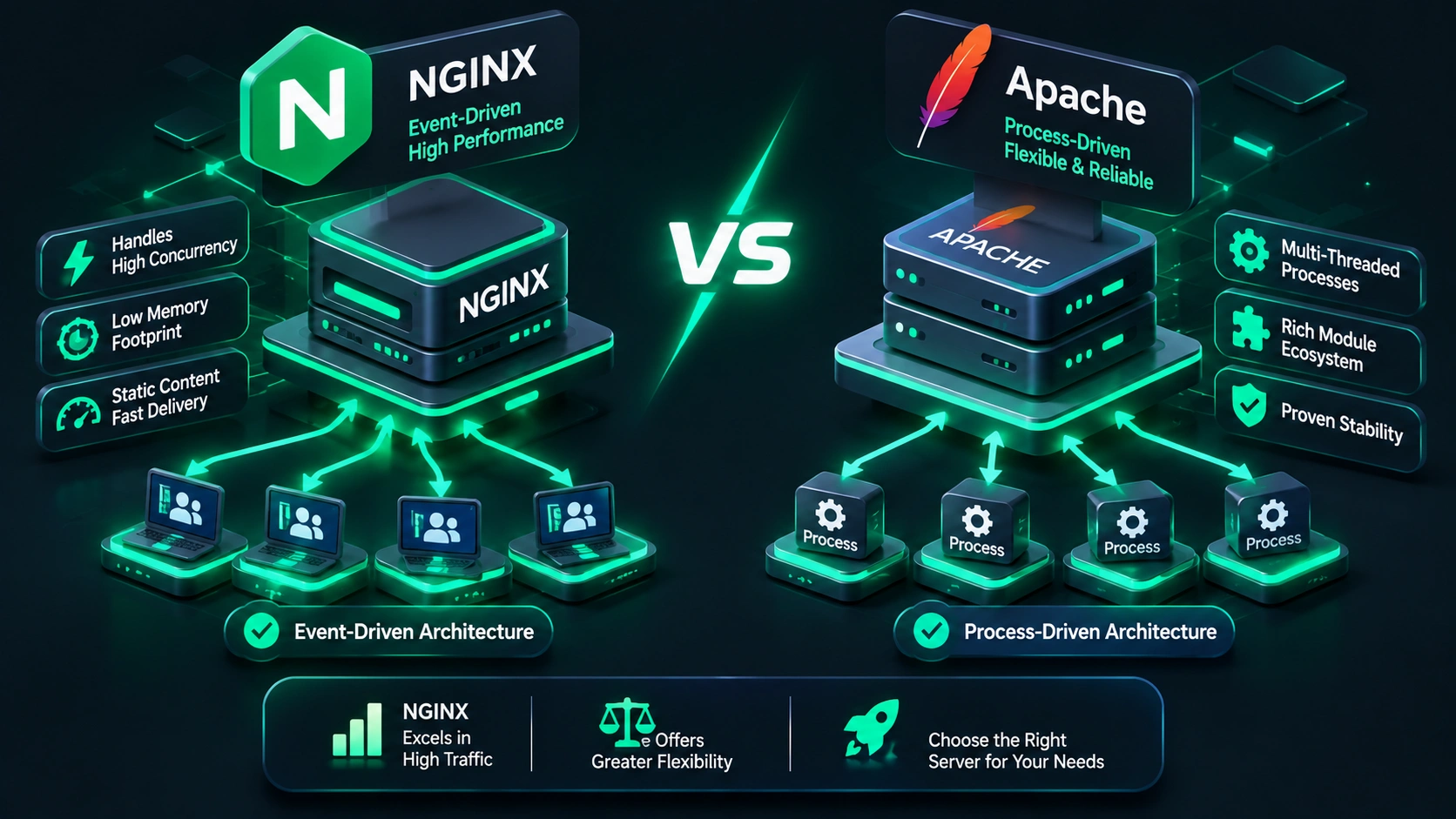
To understand why one server might outperform another, we must first analyze their underlying architectural designs. The fundamental difference between Apache and Nginx lies in how they handle incoming user requests and system resources.
Apache: Process-Driven and Multi-Processing Modules
Apache HTTP Server, released in 1995, relies on a process-driven architecture. By default, Apache creates worker processes or threads to handle each connection. It utilizes specialized Multi-Processing Modules (MPMs) to manage these connections:
- Prefork MPM: Spawns multiple single-threaded child processes. Each process handles one request at a time. While highly stable and compatible with older non-thread-safe PHP modules (like legacy
mod_php), it consumes substantial RAM under high concurrent loads. - Worker MPM: Creates multi-threaded child processes. Each thread can handle one connection. This approach reduces memory usage compared to Prefork, but requires thread-safe PHP execution.
- Event MPM: The modern default for Apache. It separates long-lived keep-alive connections from active request handling, passing idle connections to dedicated threads. As a result, Event MPM drastically improves performance and brings Apache much closer to Nginx in handling concurrent requests.
Nginx: Event-Driven and Asynchronous Architecture
Nginx (pronounced “Engine-X”) was released in 2004 specifically to solve the C10K problem—the challenge of handling 10,000 concurrent client connections on a single server. Rather than spawning a new process or thread for every incoming request, Nginx operates on an asynchronous, event-driven, non-blocking architecture.
A single Nginx worker process can handle thousands of concurrent HTTP requests simultaneously within a continuous event loop. Because Nginx does not create overhead for process context switching, its memory consumption remains virtually flat regardless of how many idle or active connections exist. However, unlike Apache, Nginx cannot process dynamic scripting languages like PHP directly. Instead, it delegates dynamic requests to an external fastCGI processor, such as [Internal Link] PHP-FPM (FastCGI Process Manager).
2. Speed and Performance: Static vs. Dynamic Requests
When comparing Nginx vs Apache performance for WordPress, it is essential to separate static content processing from dynamic PHP processing.
Serving Static Content (Images, CSS, JavaScript)
In serving static files, Nginx is substantially faster and significantly more efficient than Apache. Because Nginx reads static files directly from the file system into memory buffers without thread management overhead, it can deliver static assets up to 2 to 3 times faster under heavy load. Additionally, Nginx utilizes advanced kernel-level caching mechanisms like sendfile, minimizing disk reads and CPU overhead.
Meanwhile, Apache must evaluate configuration files, file permissions, and directory-level .htaccess overrides for every single static asset request. Although Apache using the Event MPM narrows this gap, Nginx remains the uncontested winner for static file throughput.
Processing Dynamic Content (WordPress PHP Core)
WordPress is built on PHP. When a user requests a page that is not cached in memory, the server must run PHP code and query the MySQL database. Neither server processes PHP code inside its primary HTTP loop when optimized correctly:
- Nginx + PHP-FPM: Nginx receives the HTTP request, determines it is a dynamic file, and passes it via FastCGI socket to PHP-FPM. PHP-FPM executes the script and sends the HTML response back to Nginx, which returns it to the visitor.
- Apache + Event MPM + PHP-FPM: Modern Apache configurations function in almost the exact same way, utilizing
mod_proxy_fcgito hand off dynamic processing to PHP-FPM.
Consequently, when both web servers use PHP-FPM for dynamic requests, their execution speeds for uncached WordPress pages are nearly identical because the bottleneck lies in PHP execution and database querying rather than the web server itself. However, when full-page caching plugins or server-level caching (such as Nginx FastCGI Cache) are introduced, Nginx again takes a commanding lead by serving cached HTML pages directly from memory without triggering PHP at all.
3. Scalability and Resource Management Under Load
Scalability determines how well your server copes when an article goes viral or during major promotional events like Black Friday sales on WooCommerce stores.
RAM and CPU Usage
Because Apache spawns worker processes or threads, its memory footprint grows proportionately with the number of concurrent connections. If 500 visitors attempt to load pages simultaneously on an unoptimized Apache server, RAM consumption can surge rapidly, potentially causing swap usage or dropping connections due to resource exhaustion.
In contrast, Nginx maintains a small, fixed memory footprint. An Nginx worker process typically consumes only a few megabytes of RAM even when maintaining thousands of open HTTP connections. This makes Nginx exceptional for lower-spec Virtual Private Servers (VPS) with 1GB or 2GB of RAM, where every megabyte counts.
Key Performance Insight: While Apache creates thread-based allocation for incoming requests, Nginx utilizes an event loop. Under severe concurrency, Nginx maintains minimal RAM variance, preventing server crashes during traffic spikes.
4. Configuration and WordPress Compatibility (.htaccess vs. Server Blocks)
Performance is not the only metric that matters; operational convenience and plugin ecosystem compatibility play huge roles in real-world WordPress administration.
Apache and the Power of .htaccess
Apache offers a key feature that has made it the standard for shared web hosting: directory-level decentralized configuration via .htaccess files. This allows website owners and plugins to dynamically update server rules without restarting the server or requiring root access.
Many popular WordPress plugins rely on .htaccess for:
- Pretty permalinks rewrite rules.
- Security rules (blocking malicious user agents or bad query strings).
- Caching and Gzip/Brotli compression directives.
- Redirect management (301/302 redirects).
However, this convenience comes at a severe performance cost. For every incoming request, Apache must recursively search up the directory tree for .htaccess files, open them, and parse the rules line-by-line before fulfilling the request.
Nginx and Server Blocks
Nginx does not support .htaccess files or directory-level runtime configuration overrides. All configuration rules must be written directly in central configuration files within Nginx server blocks (usually located in /etc/nginx/sites-available/).
Because Nginx loads these rules into system memory upon startup, it processes requests much faster. The downside, however, is that whenever a WordPress security or caching plugin needs to alter rewrite rules, you must either add those rules manually to the Nginx configuration or use specialized plugin integration, followed by reloading the Nginx service (nginx -s reload).
5. Security Capabilities and Hardening Options
Both Nginx and Apache are highly secure, open-source web servers maintained by active global developer communities. However, their approaches to security configuration differ significantly.
Apache Security Features
Apache has a long-standing history of robust security features. It supports ModSecurity, one of the world’s most widely recognized open-source Web Application Firewalls (WAF). ModSecurity inspects HTTP traffic in real time to prevent SQL injections, cross-site scripting (XSS), and bad bot scraping. Furthermore, Apache makes directory protection extremely straightforward using .htpasswd authentication files.
Nginx Security Capabilities
Nginx is inherently less vulnerable to directory traversal attacks because it lacks `.htaccess` functionality that can be inadvertently exposed or modified by rogue scripts. Moreover, Nginx excels at mitigating Distributed Denial of Service (DDoS) attacks due to its built-in request rate limiting modules (limit_req and limit_conn).
By enforcing limits on connection rates and request frequencies directly inside the event loop, Nginx can drop brute-force login attempts against wp-login.php before they consume system memory or CPU bandwidth.
6. Direct Feature Comparison Table
The following table provides a clear side-by-side evaluation of Nginx vs Apache specifically tailored for WordPress hosting environments:
| Feature / Metric | Nginx | Apache (Event MPM) |
|---|---|---|
| Architecture | Asynchronous, Event-Driven | Process/Thread-Driven (Hybrid in Event MPM) |
| Static File Performance | Exceptionally Fast (Minimal CPU/RAM) | Moderate to Fast (Higher overhead) |
| Dynamic PHP Performance | Requires PHP-FPM (Fast) | Requires PHP-FPM or mod_php (Fast) |
| Memory Footprint Under Load | Extremely Low and Constant | Grows with connection count |
| Directory Rules (.htaccess) | Not Supported (Server restart required) | Fully Supported natively |
| Statically compiled or dynamic modules | Extensive dynamically loaded modules | |
| DDoS & Rate Limiting | Built-in rate limiting, highly resilient | Requires additional modules / configuration |
| WordPress Ease of Setup | Requires manual server block configuration | Out-of-the-box compatibility |
7. Recommended Hosting Scenarios for WordPress
Depending on your technical expertise, site architecture, and hosting environment, one server may clearly outshine the other.
Choose Apache If:
- You use standard Shared Hosting: You require the convenience of
.htaccessto let WordPress and third-party plugins manage rewrite rules automatically. - You rely heavily on non-technical administration: You manage your site primarily through traditional hosting control panels like cPanel without SSH server management experience.
- You use custom Apache modules: You depend on legacy Apache-specific modules or customized server setups.
Choose Nginx If:
- You manage high-traffic blogs or WooCommerce stores: You need maximum throughput, rapid static file delivery, and low latency under heavy concurrency.
- You run Cloud or Managed VPS Hosting: You deploy WordPress on AWS, DigitalOcean, Linode, or managed hosts like Kinsta and WP Engine, where performance optimization is paramount.
- You want built-in Server Caching: You plan to use Nginx FastCGI Caching or Redis to serve pages in under 100 milliseconds without calling PHP.
8. The Hybrid Approach: Nginx as a Reverse Proxy for Apache
Can’t decide between the raw speed of Nginx and the user-friendly flexibility of Apache? You don’t have to!
A widely adopted setup in enterprise WordPress hosting is using Nginx as a Reverse Proxy in front of Apache. In this architecture:
- Nginx sits on the frontline (Port 80/443): It handles incoming SSL/TLS termination, buffers slow client requests, and serves static files (images, CSS, JS) instantly from its cache.
- Apache handles the background (Port 8080): When Nginx detects a dynamic PHP request, it proxies the request back to Apache on an internal port. Apache processes the PHP scripts and evaluates local
.htaccessrules seamlessly.
This hybrid configuration combines Nginx’s speed and DDoS resistance with Apache’s `.htaccess` compatibility, offering the absolute best of both worlds for complex WordPress platforms.
9. Final Verdict: Which Web Server Performs Better?
When evaluated strictly on performance, speed, and resource efficiency, Nginx outperforms Apache for WordPress sites. Its asynchronous event loop delivers superior handling of static files, maintains low memory usage during traffic spikes, and provides unmatched scaling capabilities.
However, Apache remains a resilient, feature-rich web server—especially when modern setups pair it with the Event MPM and PHP-FPM. If your hosting requires decentralized .htaccess control or you are on shared hosting, Apache is more than capable. For high-growth blogs, enterprise portals, and e-commerce stores seeking top-tier speed and low TTFB (Time to First Byte), Nginx is unequivocally the superior choice.
Related Blogs


- November 12, 2026
- 10 min read
- November 11, 2026
- 12 min read
- November 10, 2026
- 6 min read