
When launching or managing multiple websites, one of the most critical structural decisions you will make is choosing between running several Single WordPress Installations or setting up a unified WordPress Multisite (WPMU) Network.
While both systems run on the same core WordPress software, their underlying architecture, user management models, maintenance workflows, and scalability profiles are fundamentally different. Choosing the wrong path early on can lead to massive technical debt, security risks, migration headaches, and operational inefficiencies down the road.
In this comprehensive WordPress Multisite comparison, we will dissect the architecture, administrative control, performance profiles, and maintenance demands of both setups to help you make an informed architectural decision.
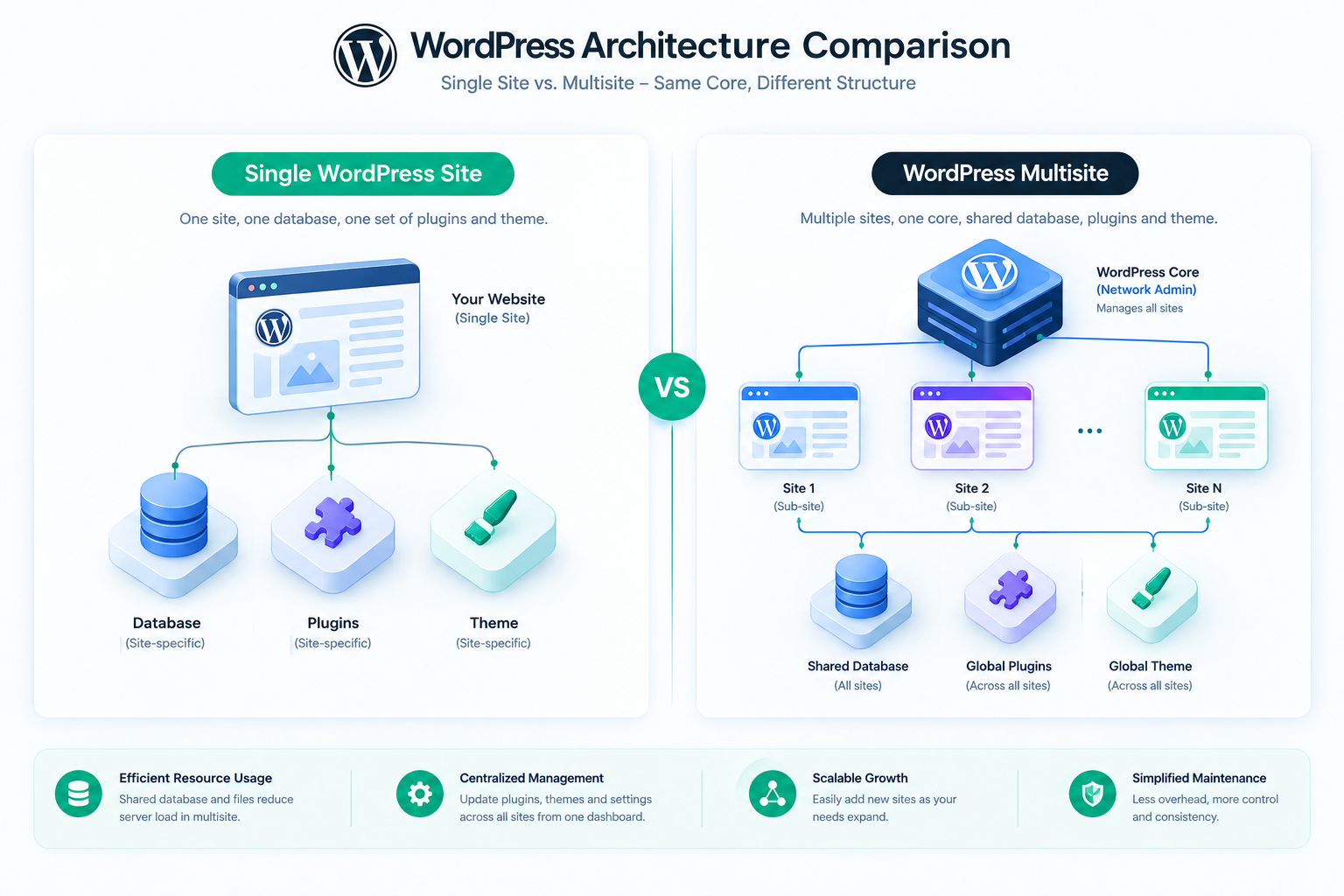
The core differentiator between a single WordPress site and a Multisite network lies in how they handle files and databases on your server.
A single WordPress site operates as an isolated, self-contained entity. It has its own directory of core files, its own wp-config.php, its own active theme and plugin directories, and a dedicated MySQL database with the standard 12 default tables (such as wp_posts, wp_options, and wp_users).
If you have five single WordPress sites, you have five separate databases, five sets of core files, and five places where media uploads are stored. They are completely sandboxed from one another; a failure or security compromise on one site has zero direct impact on the others.
A WordPress Multisite network runs on a single codebase and a single database, regardless of whether you have 5 sub-sites or 5,000. It is a multi-tenant application managed under one umbrella.
wp_users and wp_usermeta across the entire network. For individual sub-sites, WordPress dynamically generates custom prefixed tables (e.g., wp_2_posts, wp_2_options).wp-config.php file, one .htaccess (or Nginx config file), and one wp-content folder. All themes and plugins are stored once in this shared directory.wp-content/uploads/ directory, Multisite structures files chronologically under wp-content/uploads/sites/, with designated sub-folders for each site ID.Who controls what? The administrative landscape changes drastically when migrating from a single-site model to a multisite network.
On a single WordPress site, the highest user role is the Administrator. The Administrator has absolute control over that specific site: they can install, update, and delete plugins/themes, modify core settings, edit code, and create or delete users. If you manage multiple single sites, you must log in to each site individually to perform these administrative tasks (unless you use a third-party multi-site management tool like MainWP, ManageWP, or InfiniteWP).
In a WordPress Multisite network, a new super-role is introduced: the Super Admin. The Super Admin has global authority over the entire network.
“By centralizing plugin and theme management under the Super Admin, WordPress Multisite dramatically reduces administrative overhead, but it comes at the cost of restricting individual site owners’ flexibility.”
How do both options handle resource utilization and spikes in traffic? Scalability is a key battleground in this WordPress Multisite comparison.
Scaling single sites is mathematically straightforward. Because each site runs on its own isolated resource pool, a sudden traffic spike on “Site A” will consume server memory and CPU allocated to that specific site. The other sites (Site B, Site C, etc.) on the same server may experience minor resource constriction if sharing a VPS, but they can easily be isolated using containerized environments (like Docker or LXC) or moved to entirely separate hosting environments. This isolation ensures high application availability.
Scaling a Multisite network requires a highly optimized hosting stack because all sub-sites draw from the exact same pool of PHP workers, memory limits, and database connections.
The daily effort required to maintain, secure, and update your websites is a massive factor when deciding between these two architectural patterns.
On a Multisite network, updating is exceptionally efficient. To update WordPress core, a plugin, or a theme, you do it once from the Network Admin dashboard. Instantly, every single sub-site running that plugin or theme is updated. In contrast, on individual single sites, you must update the plugin or theme on every single installation separately, which is highly repetitive and time-consuming.
This efficiency in Multisite comes with a massive security and stability trade-off:
Backing up a single site is simple: you back up the database and the wp-content folder. Restoring it takes minutes. Backing up a Multisite network requires backing up the entire database. If you need to restore just one sub-site to an earlier state without affecting the other sub-sites, doing so is highly complex because you must isolate and selectively restore tables with specific prefix IDs while maintaining relational integrity. This often requires premium backup tools like command-line operations (WP-CLI) or specialized migration plugins.
Here is a detailed, direct comparison of the technical specifications, capabilities, and administrative workflows of both setups:
| Feature / Dimension | Single WordPress Installation | WordPress Multisite Network |
|---|---|---|
| Database Structure | Dedicated database per site (Isolated). | One shared database for all sites (Shared tables). |
| Core Codebase | Independent files per site. | One central set of core files, plugins, and themes. |
| User Administration | Administrator has absolute control of site settings, themes, and plugins. | Super Admin controls the network; Site Admin has limited permissions. |
| Plugin & Theme Management | Installed and managed independently per site. | Installed centrally by Super Admin; activated/deactivated per site. |
| Security Profile | Isolated risk. A breach on one site does not affect others. | Shared risk. Compromise of one network layer affects all sub-sites. |
| System Updates | Must be updated on each separate site (increased overhead). | Updated once globally for all sites (high efficiency). |
| Resource Consumption | Isolated resource allocation. | All sites share the same PHP workers, memory, and database connections. |
| Backup & Restoration | Extremely simple to backup and restore individual sites. | Complex to restore a single sub-site without restoring the whole network. |
| Domain Mapping | Configured via DNS and standard server hosting configuration. | Built into WordPress core; requires wildcard DNS or manual domain mapping setup. |
To help you decide, let’s break down the perfect use cases for each setup.
There is no absolute “winner” in the Single Site vs. WordPress Multisite comparison. Instead, they represent two different architectural paradigms designed to solve entirely different problems.
If your priority is administrative efficiency, shared resources, and standardized brand networks, then WordPress Multisite is a highly elegant and powerful engine that will save you hundreds of hours of maintenance time. However, if your priority is uncompromised security isolation, deep customization flexibility, and ease of individual backups, running isolated Single WordPress Sites is the safer, more robust choice.
Analyze your long-term scalability requirements, administrative team structure, and security tolerances before choosing. If you do go the Multisite route, ensure you pair your network with premium, highly scalable managed WordPress hosting that can dynamically allocate resources as your network expands.